Showing posts with label Tutorial. Show all posts

Sunday, October 4, 2015

How to Write and Collaborate on LaTeX Documents Online

LaTeX is one of the best options to write scientific papers. However, collaboration on a paper among many authors is usually not fun. Below are a number of tools that offer online editing and collaboration for creating LaTeX documents. They all offer a free option, and a paid one, with features varying depending on the service provided. For those who are looking for a free option with many collaborators, Overleaf and Papeeria seem like good options.

[Wikipedia]

Thursday, July 2, 2015

How to add a font to Blogger

Although Blogger already provides a number of different web fonts, it is sometimes useful to add new fonts, e.g. Arabic fonts or other languages that don't have good standard fonts. You can add any font to Blogger in these easy steps.

Wikipedia


Tuesday, June 23, 2015

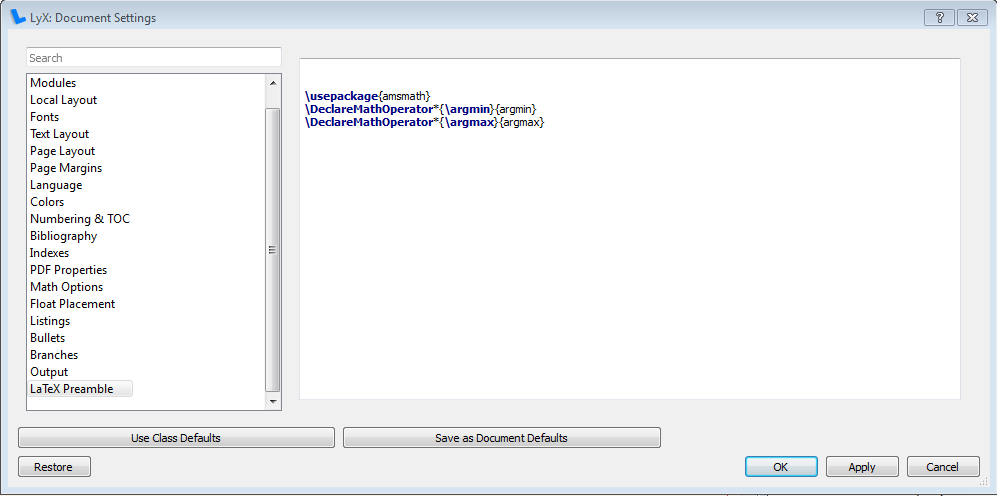
How to add argmin and argmax to LyX

To use argmin and argmax in LyX (or LaTeX in general), simply add the following three lines in the LaTeX preample from Document -> Settings as show below:

\usepackage{amsmath} 
\DeclareMathOperator*{\argmin}{argmin}
\DeclareMathOperator*{\argmax}{argmax}


and then use it in any equation as \argmin or \argmax.

References

Monday, June 1, 2015

How to Add Creative Commons License to Blogger

Creative Commons is one of the most common public licenses on the Internet, that allow for sharing and disseminating knowledge. Here are a few steps to add your license to both the footer of the whole blog and/or to the footer of each post.

Saturday, May 30, 2015

How to Add Syntax Highlighting to Blogger

Code Prettify is an excellent Javascript-based syntax highlighter that supports many different languages and styles. To add it to Blogger, simply follow these two steps:

Friday, May 29, 2015

How to add Open Graph Meta Tags to Blogger

Open Graph meta tags from Facebook allow some control over how the snippet is generated by Facebook when the page is shared. This nice article explains how to generate these meta tags automatically from within blogger. In summary, follow two steps by editing the HTML template.