
LaTeX is one of the best options to write scientific papers. However, collaboration on a paper among many authors is usually not fun. Below are a number of tools that offer online editing and collaboration for creating LaTeX documents. They all offer a free option, and a paid one, with features varying depending on the service provided. For those who are looking for a free option with many collaborators, Overleaf and Papeeria seem like good options.
 |
| [Wikipedia] |
1. Overleaf
Overleaf offers a decent free option with unlimited projects and collaborators, and limited storage. You can get more storage by inviting people to use it.

2. Papeeria
Papeeria also offers a nice free option with unlimited public projects and one active private project.

3. ShareLaTeX
ShareLaTeX offers free unlimited projects but with only one collaborator.
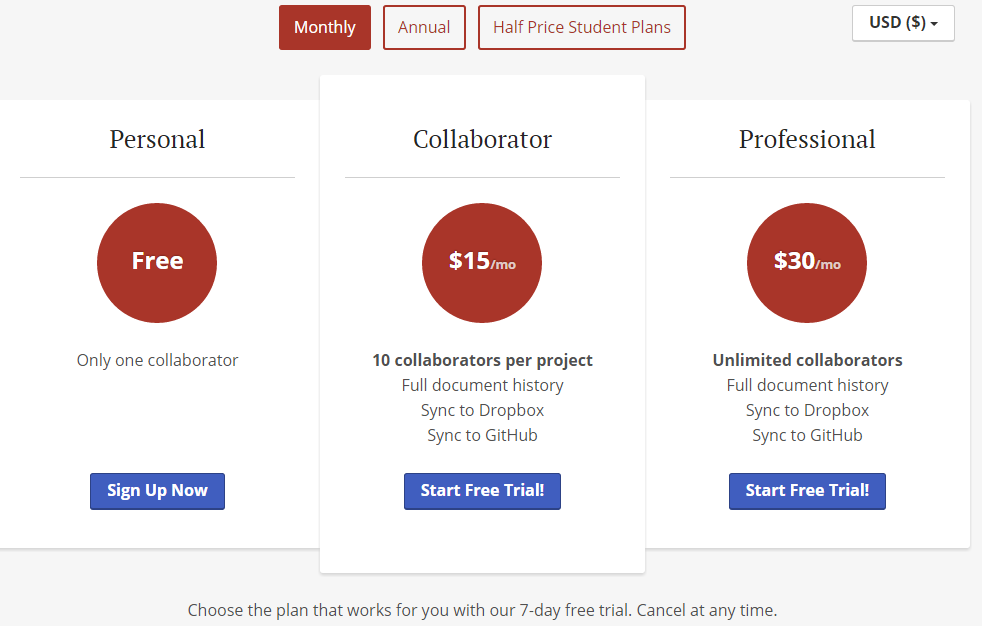 |
| ShareLaTeX |
4. Authorea
Authorea offers only one free project with unlimited collaborators and reviewers.

5. cloudTeX
cloudTex offers a free plan with only one private article and unlimited public articles and collaborators.


I like the idea of writing and collaborating on LaTeX online because it makes technical documents much easier to work on together. What also interests me is how LaTeX handles typography so consistently, especially when a document contains mathematical formulas, references, and different sections. Choosing the right font can make a technical paper feel much cleaner and easier to read, even when the content itself is quite complex. I usually pay more attention to fonts than I expect when working on documents, since spacing, letter shapes, and readability can change the whole presentation. For anyone exploring personalized typography and lettering ideas, http://letraspersonalizadas.org can be another interesting source of inspiration.
ReplyDelete